You’ve just finished a great blog post. Now you need a voiceover, an audio version, and a reel. Sound familiar? Content creation can feel like running on a hamster wheel: write, record, flub a line, re-record, edit and repeat it all over again.
What if you could skip the microphone, the quiet room, and the endless retakes? That’s where ElevenLabs comes in. This AI voice tool turns your text into natural-sounding speech, clones voices, and even dubs your content into 90+ languages.
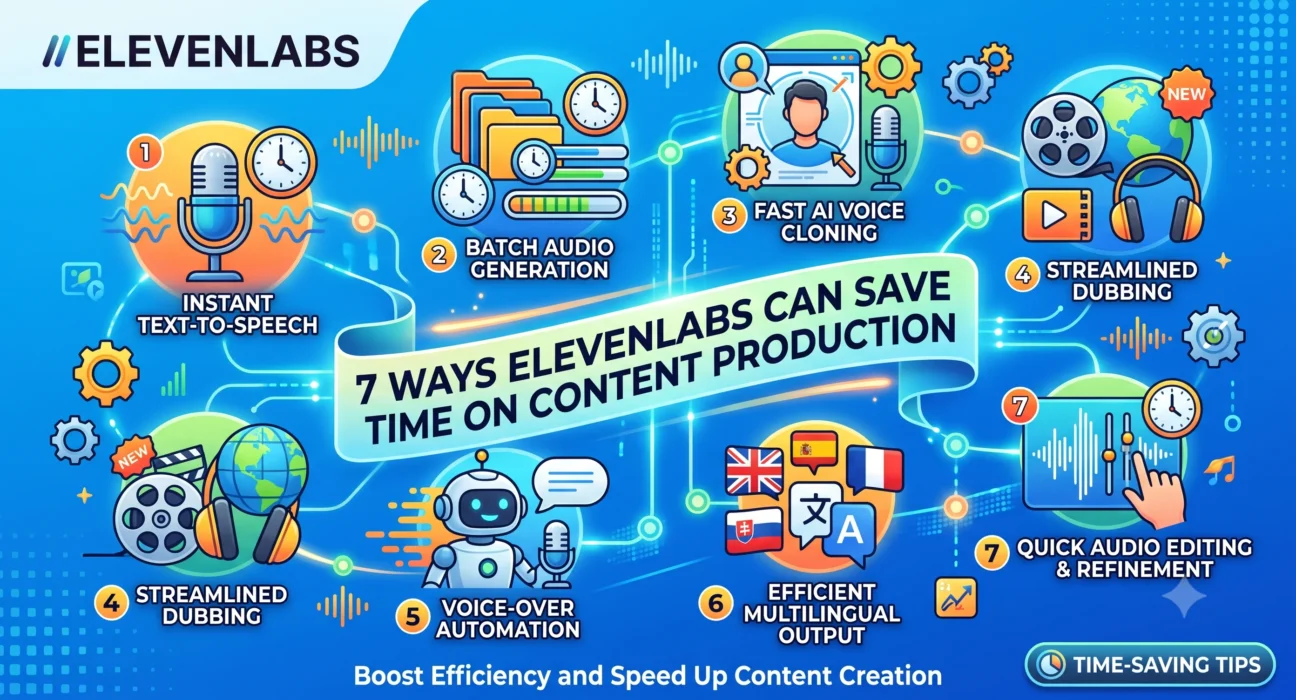
Here’s how it can take the slowest, most repetitive parts of content creation off your plate, so you can focus on the fun part: creating.
How ElevenLabs Simplifies Content Creation?
Content creation is hectic: you write, record, fix mistakes, edit, and then do it all again for another language or format. ElevenLabs is an AI voice tool that can take over a big part of that work and here’s how
1. Turn Written Content Into Natural-Sounding Voiceovers
You don’t need a microphone or a quiet room. ElevenLabs allows you to paste your text, pick a voice, and get an audio file back. The tool creates lifelike audio with natural pacing and emotion.
Time saved: No recording sessions, no repeating lines after a mistake.
Tip: The voice picks up feeling from your text, so a sentence with an exclamation mark sounds more excited. Descriptive words like “she said excitedly” will be spoken out loud, so you may need to trim them from the audio.
2. Create Audio Versions of Blog Posts Faster
Many people like to listen while driving, cooking, or walking. You can turn a finished blog post into an audiobook in minutes and add a “Listen to this article” option for your readers.
Time saved: One written piece becomes two formats with almost no extra work.
Tip: Split it into smaller parts if it is a long blog post. This helps the voice sound smooth from start to finish.
3. Generate Voiceovers for Videos and Reels
Voiceovers are often the slowest part of making a video. With ElevenLabs you write the script, generate the voice, and place it over your video. If a clip has a small flaw, you can regenerate the same text up to 2 times for free. That is useful for fixing small glitches.
Time saved: You can change a script and get a new voiceover in minutes instead of re-recording.
4. Produce Multiple Voice Styles for Different Content
Not every piece of content should sound the same, right? A calm voice may suit a tutorial, and an energetic one may suit a promotional reel. ElevenLabs gives you several ways to get the right voice:
- A voice library with 3,000+ voices shared by the community
- Voice cloning, which copies a voice from a short audio clip (instant cloning is fast, professional cloning is higher quality)
- Voice design, which creates a new voice from a written description
Time saved: You don’t have to hire different voice artists or search for them.
5. Speed Up Podcast and Audio Content Production
Podcasts and audio shows take a lot of editing. ElevenLabs offers helpful tools beyond text-to-speech. It also has tools for speech-to-text (turning audio into written text), sound effects, music, and a voice isolator that separates a voice from background noise.
Time saved: Intros, outros, ads, and short updates can be made without a new recording session.
6. Create Multilingual Content Without Recording Again
This is one of the biggest time savers. Normally, reaching people in another language means translating, finding a speaker, and recording again. ElevenLabs lets you get a version in another language much faster.
- Text to speech: The number of languages depends on the model. Multilingual v2 supports 29 languages, Flash v2.5 supports 32, and the newest Eleven v4 model supports 90+.
- Dubbing: Dubbing translates audio and video across 90+ languages while keeping the emotion, timing, and tone of each speaker. The original background audio is kept too.
7. Streamline Content Updates and Repurposing
Content changes all the time. Prices change, facts change, and scripts get edited. With a recording, a small change means recording again. With ElevenLabs, you edit the text and generate the audio again. You can also reuse one piece of content in many ways. A blog post can become an audio version, a video voiceover, a short reel, and a version in another language.
Time saved: Updates take minutes, and one idea can be used in many places.
Things to Know Before You Start
- Free plan limits: Commercial use (like making money from your audio) is only allowed on paid plans. You own what you generate, but you need a paid plan to use it commercially.
- Rights matter: You can use the audio commercially only if you own the rights to the text you put in. Only clone voices you have permission to use.
- Check pricing: Plans and prices change, so look at the official ElevenLabs pricing page before you decide.
- Always listen first: AI voices are very good, but they can mispronounce names or unusual words. A quick review saves you from embarrassing mistakes.
Final Thoughts
ElevenLabs does not replace good ideas or good writing. It removes the slow, repeated work of recording, re-recording, and translating- so you don’t have to. If you make blogs, videos, reels, or podcasts, start with the free plan of 2 regeneration, test one piece of content, and see how much time you save.
FAQs
Q. How much does ElevenLabs Dubbing cost?
A. Dubbing v1 costs $0.33 per minute, while Dubbing v2 costs $2.20 per minute. You can also use credits from your monthly plan.
Q. How much does ElevenLabs Creative cost?
A. Plans start at $0 for Free and go up to $990/month for Business. Starter costs $6, Creator $22, Pro $99, and Scale $299 per month.
Q. Is ElevenLabs safe to use?
A. ElevenLabs follows security rules such as GDPR, HIPAA, and ISO 27701. Its policy says some voice data may be kept for up to three years.