Have you ever received an Amazon order that wasn’t quite what you expected? Maybe the item arrived damaged, it didn’t fit, or you simply changed your mind after it was delivered.
The good news is that returning items on Amazon UK is usually quick and simple. You don’t need to worry if you’ve never returned a product before because the entire process can be completed in just a few simple steps.
Amazon has made returns easy by offering several drop-off and collection options across the UK. In many cases, you can even return an item without printing a label. Whether you’ve bought clothing, electronics, home products, or gifts, this guide will walk you through exactly how to return items on Amazon UK.
Understanding How to Return Items on Amazon UK
Before starting a return, it’s helpful to know how Amazon’s return policy works. Most items sold on Amazon UK can be returned within 30 days of delivery if they’re unused and in their original condition. However, some products have different return rules depending on the seller or the type of item. For example, clothing, shoes, and accessories often qualify for free returns, while personalised products, digital downloads, and certain hygiene items may not be eligible once opened. During special shopping seasons, Amazon sometimes extends the return window, giving customers more time to send products back. If your item arrives damaged, faulty, or incorrect, Amazon will usually offer a full refund or replacement without any hassle.
Step 1: Sign In to Your Amazon UK Account
- The first step is to log in to your Amazon UK account using the website or the Amazon Shopping app.
- Once you’re signed in, go to the “Your Orders” section. Here you’ll find a complete list of everything you’ve purchased recently.
- Scroll through your orders until you find the item you want to return.
Step 2: Select the Item You Want to Return
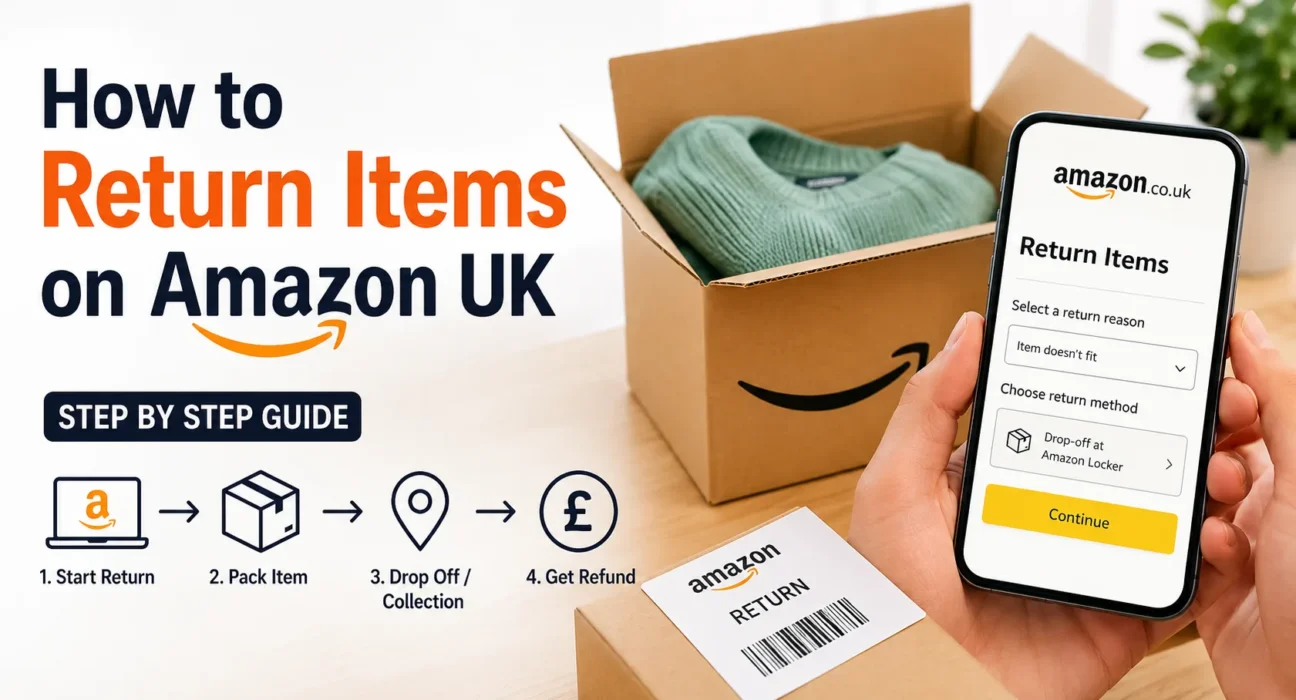
After finding your order, click or tap the “Return or Replace Items” button next to the product. Amazon will then ask you to choose the reason for your return. You’ll see several options, including:
- The item arrived damaged.
- The wrong item was delivered.
- The product doesn’t match the description.
- The item is defective.
- You no longer need the item.
Simply choose the reason that best matches your situation. This helps Amazon process your return more quickly.
Step 3: Choose Your Preferred Refund Option
Once you’ve selected the return reason, Amazon will show the available refund methods. In most cases, you can receive your money back through your original payment method. Some items also allow refunds to your Amazon account balance, which can be used immediately for future purchases. Depending on the product, Amazon may even offer a replacement instead of a refund if the item is faulty or damaged. Choose the option that works best for you before moving to the next step.
Step 4: Select a Return Method
One of the reasons many people like shopping with Amazon UK is the variety of return options available. Depending on your location and the item you’re returning, you may be able to drop your package off at a local collection point, Post Office, Evri ParcelShop, Amazon Locker, or another authorised return location. Some products also qualify for home collection, where a courier picks up the package directly from your address. Amazon will automatically show the return methods available for your order.
Step 5: Prepare Your Package
After selecting your preferred return method, it’s time to pack your item. Whenever possible, place the product back in its original packaging along with any accessories, manuals, or included parts. This helps avoid delays when Amazon inspects the return. If your return requires a label, print it and attach it securely to the outside of the package. However, many returns now come with a QR code, meaning the drop-off location will print the label for you. Always remove or cover any old shipping labels if you’re reusing the original box.
Step 6: Drop Off or Hand Over Your Package
Take your package to the selected return location or wait for the scheduled collection if you’ve chosen home pickup. If you’re using a QR code, simply show it to the staff at the return point. They’ll scan the code, print the shipping label if needed, and accept your package. Don’t forget to keep your receipt or proof of return until your refund has been completed. It can be useful if you need to track your return later.
How Long Does an Amazon UK Refund Take?
Once Amazon receives your returned item, the inspection process usually begins quickly. In many cases, refunds are processed within a few days. Depending on your payment provider, the money may appear in your bank account or card within 3 to 7 business days. Some customers even receive refunds before Amazon physically receives the returned item, especially if they have a strong account history and the product is low value. Refund times may vary depending on the payment method and the type of product.
What Happens if the Item Was Sold by a Third-Party Seller?
Not every product on Amazon UK is sold directly by Amazon. Many items come from independent sellers using the Amazon Marketplace. If your order was sold by a third-party seller, the return process is still started through your Amazon account. However, the seller may review your request before approving it. Most trusted sellers respond quickly, and Amazon’s A-to-z Guarantee helps protect customers if a seller doesn’t resolve a legitimate issue.
Tips to Make Your Return Easier
Returning an item is usually simple, but a few small steps can make the process even smoother. Keep the original packaging until you’re sure you want to keep the item. Save any receipts or confirmation emails related to your return. If you’re returning electronics, remember to remove your personal data before sending them back. It’s also a good idea to start the return as soon as possible instead of waiting until the final days of the return window.
Common Reasons Why Returns May Be Rejected
Although Amazon approves most eligible returns, there are situations where a refund may not be granted. Items returned outside the return window, products that show signs of heavy use, missing accessories, or damaged packaging can sometimes affect the refund amount. Certain products, including opened hygiene items, digital downloads, gift cards, and personalised products, often cannot be returned unless they’re faulty. Reading the product’s return policy before purchasing can help avoid surprises later.
Final Thoughts
Returning items on Amazon UK is designed to be fast, convenient, and stress-free. Whether you’ve received the wrong item, changed your mind, or found a fault with your purchase, the return process only takes a few simple steps. By logging into your account, selecting the item, choosing your return method, and sending the package back, you can usually receive your refund within just a few days. Amazon’s flexible return options, easy tracking, and customer-friendly policies make returning products much less complicated than many people expect.
For more e-commerce details, make sure to visit this website.
FAQ
1. How long do I have to return an item on Amazon UK?
A. Most items purchased from Amazon UK can be returned within 30 days of delivery. However, some products may have different return periods, and Amazon often extends the return window during the holiday season.
2. Do I have to pay for returns on Amazon UK?
A. Many items sold by Amazon UK qualify for free returns, especially if they are faulty, damaged, or incorrect. Some third-party sellers or specific product categories may charge a return fee, so it’s always worth checking the return details before sending an item back.
3. How long does it take to get a refund from Amazon UK?
A. After Amazon receives and processes your returned item, refunds are usually issued within a few days. Depending on your bank or payment provider, the money typically appears in your account within 3 to 7 business days.